
My assets in the user menu
One entry in the Help Center user menu opens a window with the Assets objects assigned to the signed-in customer. No Assets or Jira licence and no Assets permissions required.
For Jira Service Management Cloud with Assets
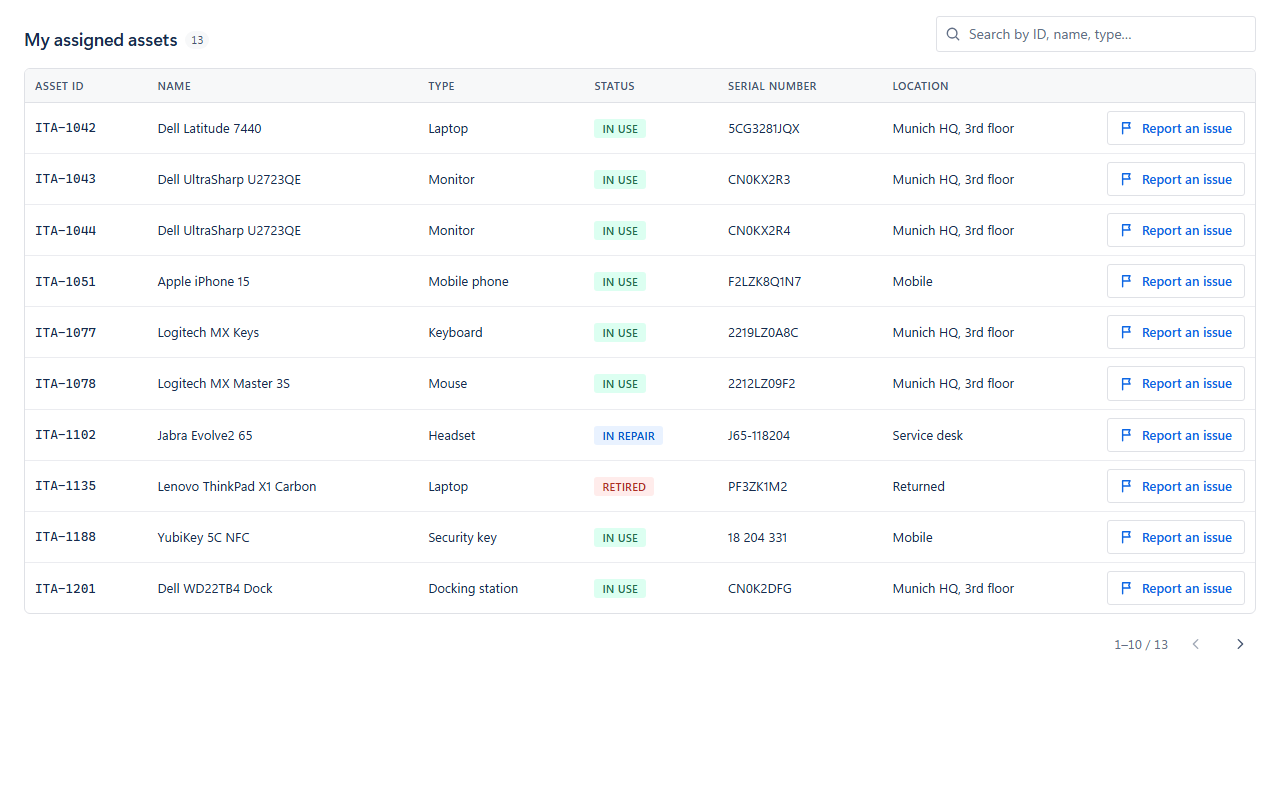
Customer Assets for JSM Portal adds a My assets view to your Help Center. Customers see the Assets objects assigned to them and can report an issue against a specific asset — without Assets permissions and without a Jira or Assets licence.
Why it matters
Assets knows who owns which laptop, phone or service. Portal customers have no Assets permissions of their own, so that knowledge stays out of reach exactly where they ask for help.
Features
Everything instance-specific — schemas, attributes, columns, projects, audience — is configured on the settings page. Nothing is hard-coded.
One entry in the Help Center user menu opens a window with the Assets objects assigned to the signed-in customer. No Assets or Jira licence and no Assets permissions required.
Search across all shown columns. Sortable columns and paging at 10 rows per page. URL and e-mail values become links.
Status lozenges take their colour from the Assets status category, so they read the same in every language and for every status name.
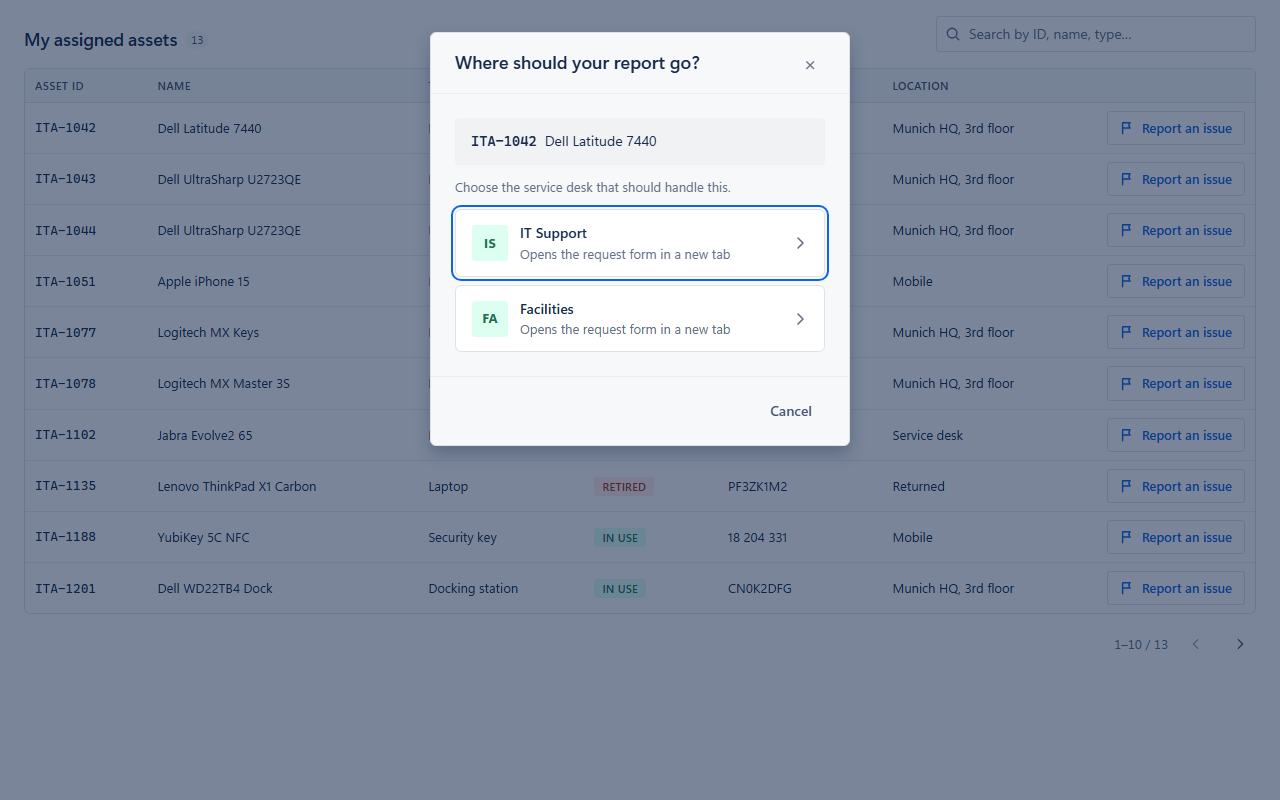
Opens the native JSM request form with summary and description prefilled. With several service desks configured, customers choose one — and are only offered those they can raise requests in.
A short hint at the top of the form explains that the Assets field is filled automatically. It appears only on forms opened from an asset row.
Follows the customer’s Jira theme, light or dark, and is available in 26 languages with English as the fallback.
The app reads Assets as the app, with Forge app authentication — no service account, no e-mail, no API token. Status tiles show whether the app can read Assets; if it cannot, the settings page says why (no Assets workspace, app update not yet approved, or Assets temporarily unreachable).
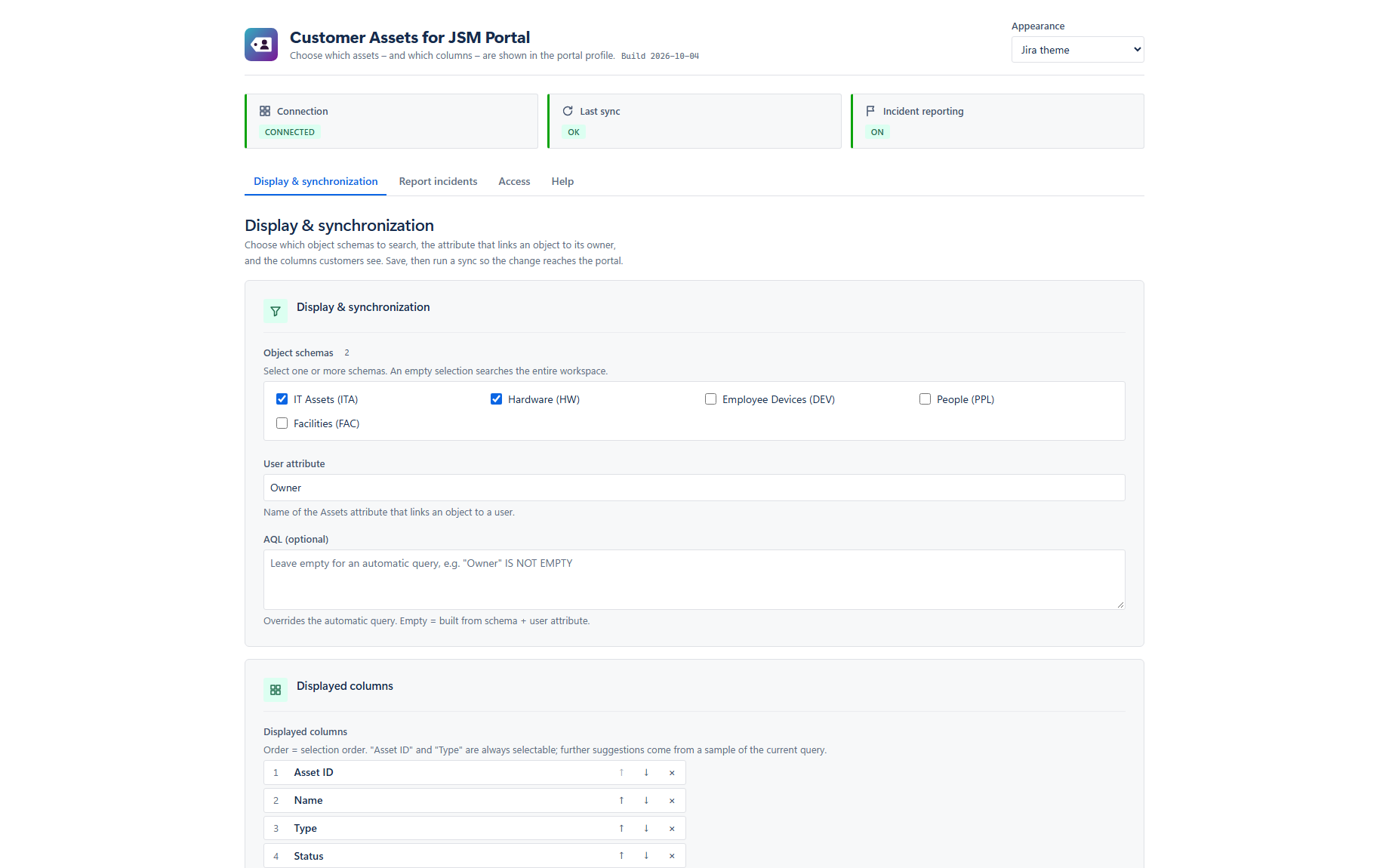
Choose object schemas (or all), the owner attribute (default Owner), an optional AQL override and the visible columns in order — column changes need no re-sync. Hourly sync plus Sync now, with the last result on screen.
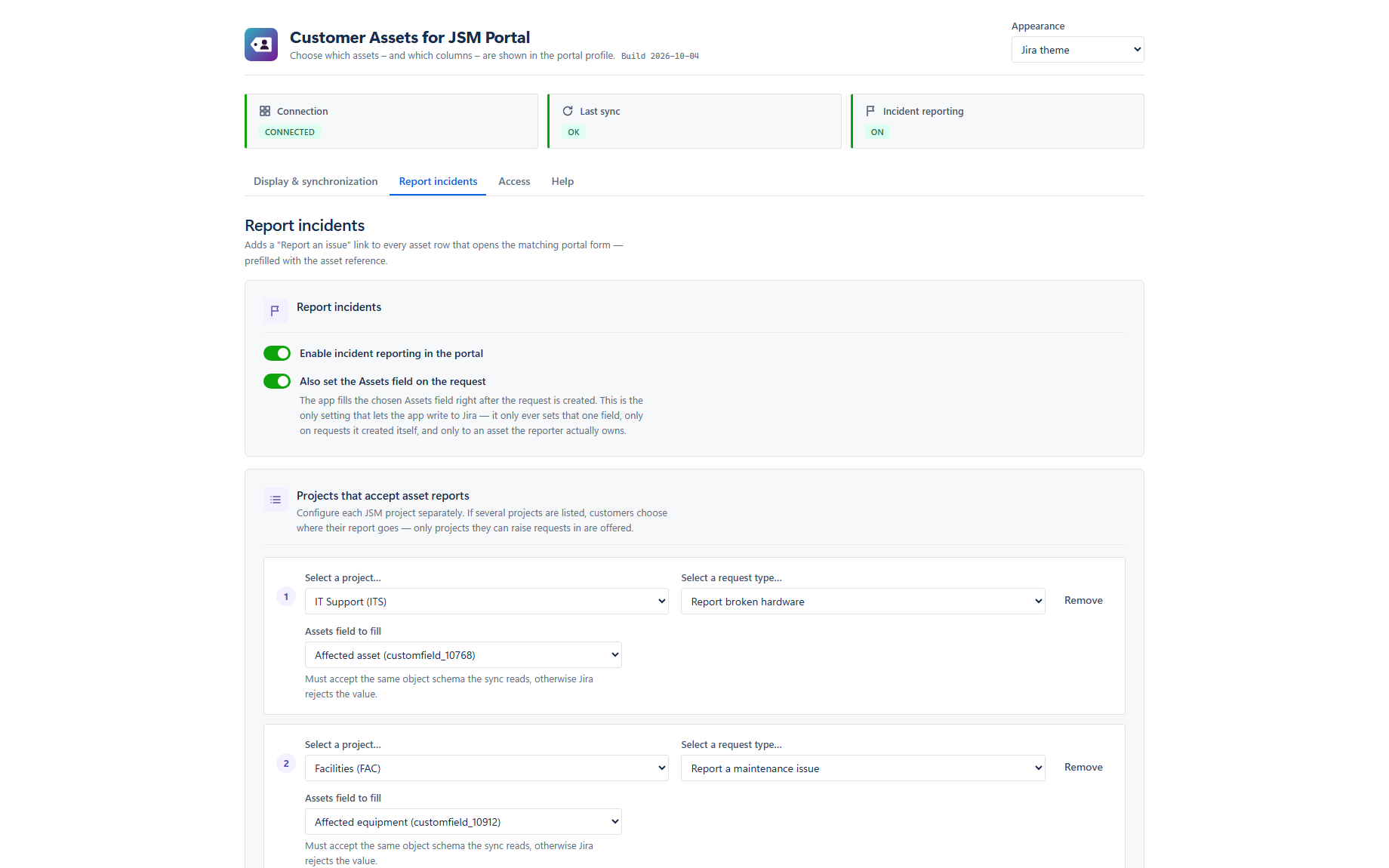
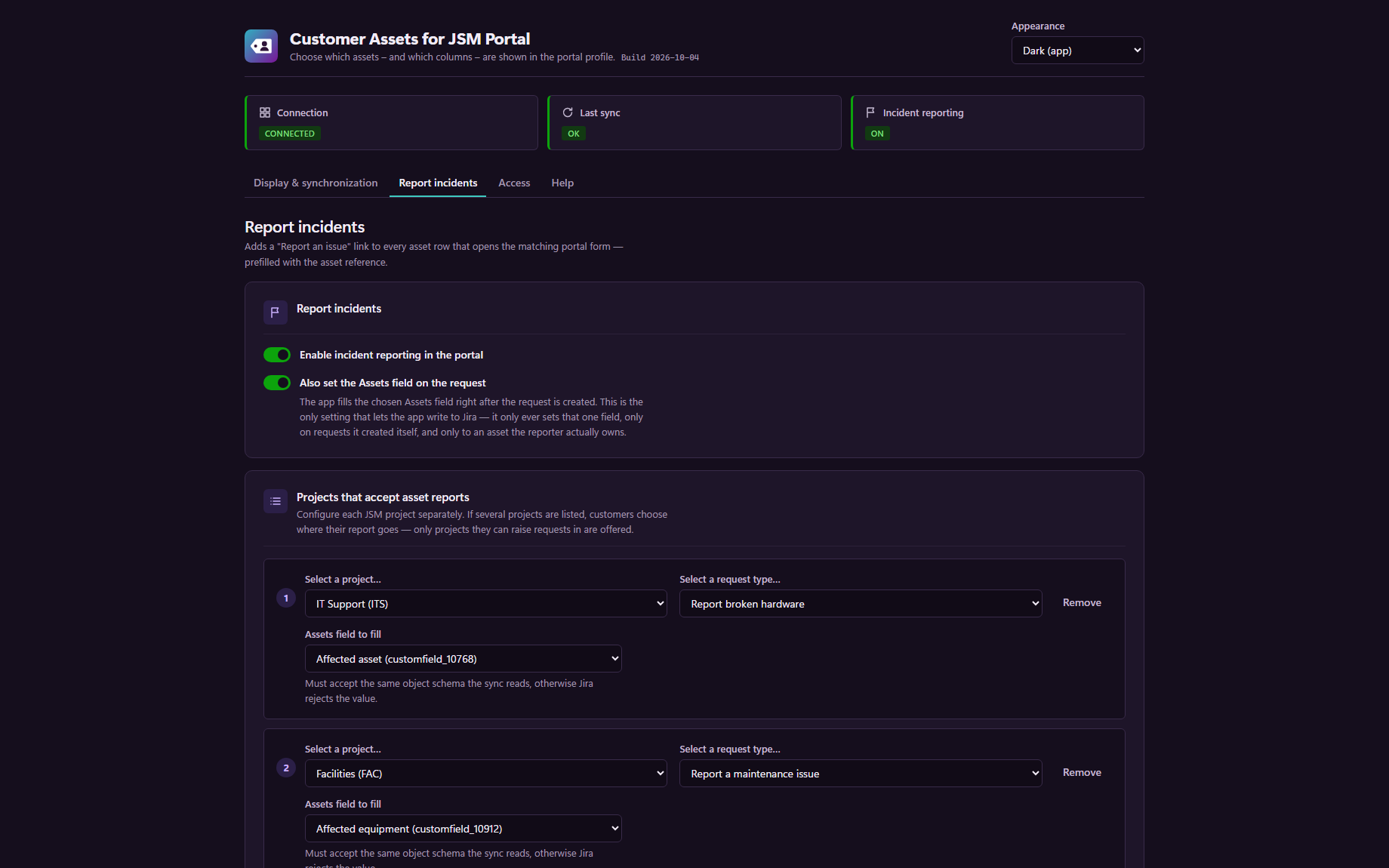
One row per JSM project: request type and optional Assets object field. Optional summary and description templates with {asset}, {assetKey}, {assetName} and {assetType}.
Off by default. When enabled, the app writes the asset into the project’s chosen Assets field right after the request is created — only for requests it originated and only with an asset from the reporter’s own list.
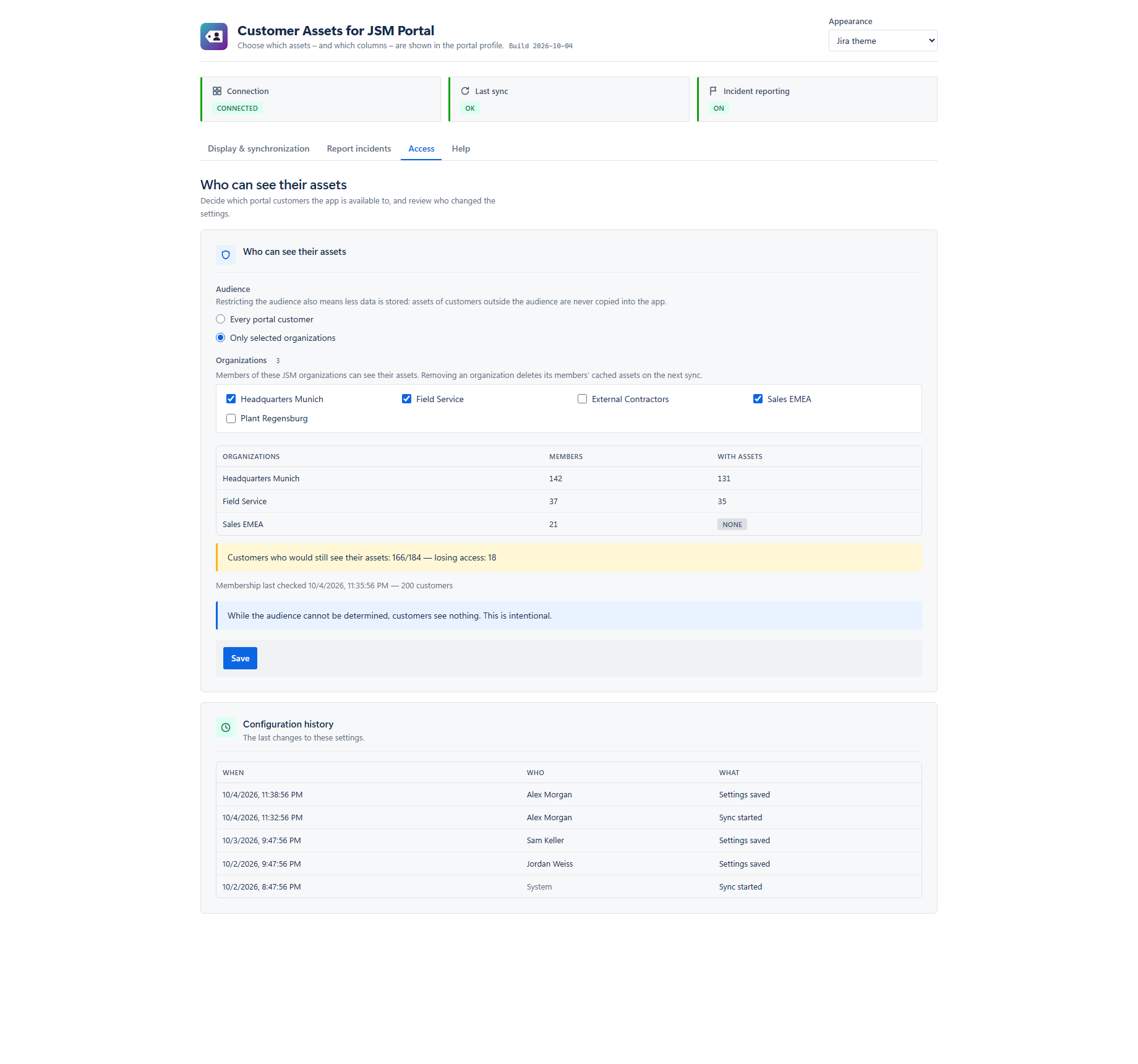
Restrict the feature to members of selected JSM organisations, or offer it to every portal customer (default). An impact preview shows who would gain or lose access.
The last 50 configuration changes: when, who and what. Entries record counts only — never AQL text.
Also on the settings page: quick help with links to every chapter of the manual, and a choice between the Jira theme (default, follows each administrator’s Jira theme) and the app’s dark appearance.
How it works
The portal never queries Assets when a customer opens it. A background sync reads Assets as the app, prepares each customer’s list in advance and stores it in Forge storage inside your Atlassian site; the portal reads only that list.
The portal reads pre-computed data. Opening My assets does not wait for an Assets query.
Data is as current as the last sync: hourly, or on demand when an administrator clicks Sync now.
The app has no web trigger. On-demand sync is started only from the settings page, by a Jira administrator.
Incident reporting
When incident reporting is enabled, every asset row offers Report an issue. Customers land in the native JSM request form — your request types, your fields, your workflow.
The customer clicks Report an issue on the affected row in My assets.
With one configured project the form opens directly. With several, the customer picks the service desk — from those they can actually raise requests in.
Summary and description are prefilled with the asset reference, from your templates if you defined them. A hint explains that the Assets field is filled automatically.
Optional: right after the request is created, the app writes the asset into the project’s chosen Assets object field.
Jira Service Management cannot prefill Assets object fields from a link. The app therefore sets the field just after the request is created — and only within strict bounds: requests carrying the app’s own marker, the configured request types, and an asset from the reporter’s own cached list. On any ambiguity it refuses to write.
Screenshots
Rendered from the real user interface with demo data.
Security & privacy
The app reads your Assets data as the app, read-only, and stores it only in Forge storage of your installation. It holds no credentials, calls no external endpoint, and vi2va has no access to the stored data.
Languages
The portal view and the settings page are localised. Unsupported locales fall back to English (US).
FAQ
No. Customers see their assigned assets without an Assets or Jira licence and without Assets permissions of their own. The app reads the data as the app, with Forge app authentication, and serves each customer only their own list.
No. The app reads Assets as the app, using Forge app authentication and two read-only Assets scopes. Setup is: install the app, approve its permissions, and choose what to show on the settings page. If Assets cannot be read — the site has no Assets workspace, the app update has not been approved yet, or Assets is temporarily unreachable — the settings page says so. When you upgrade from an earlier version that used a service-account API token, an administrator approves the app update and its new permissions in Manage apps; the token stored by the earlier version is then deleted automatically.
The objects whose configured owner attribute (default Owner) points to that customer, within the object schemas you selected, or the result of your optional AQL override. Administrators choose which columns are shown and in which order; the customer’s browser receives only those columns plus key, name, type and status category.
No. The portal resolver returns only the list stored for the signed-in account, identified from the Forge context on the server. No identifier sent from the browser is trusted for this decision.
As current as the last sync. The app checks for changes every hour and runs a full reconciliation at least once a day. Administrators can start a full sync at any time with Sync now.
Yes. Restrict the feature to members of selected JSM organisations; by default every portal customer can use it. The restriction is fail-closed: while membership cannot be determined or is older than 24 hours, customers see nothing.
No. The app declares no external endpoint at all: every call goes through Forge to your own site’s Jira, JSM and Assets APIs, and results are stored only in Forge storage. There are no vendor servers, no third parties and no sub-processors. One thing to know: Forge shares the app’s logs with vi2va by default (a site admin can turn this off; retained for 30 days). The logs contain counts, error codes and issue and asset keys — never account ids, e-mail addresses or attribute values, and the app has no credentials that could be logged. See Security & privacy.
In Forge storage of your installation. Atlassian documents Forge storage as data-residency-enabled: because the app stores everything there and declares no external endpoint or remote, its data follows your site’s data residency location (for example EU, Germany, US or Australia when the site is pinned there) and moves with the site when an administrator migrates it. Details are on the security page.
It is eligible. The app has no data egress, no remote and stores its data only in Forge storage, and Forge reports it as eligible for the Runs on Atlassian programme. Atlassian shows the badge on the Marketplace listing once the listed version qualifies. Details are on the security page.
Jira Service Management cannot prefill Assets object fields from a link. If you enable the option, the app sets the field right after the request is created, for requests it originated only.
The projects your administrator configured, filtered by the customer’s own desk access. Unlicensed portal accounts cannot make that access lookup, so they are offered all configured projects.
Forge soft-deletes all app storage. Under Atlassian’s data lifecycle it can be relinked on request for 21 days and is then deleted.
Atlassian Cloud only. The app is built on Atlassian Forge for Jira Service Management with Assets and is licensed through the Atlassian Marketplace.
The app is a paid app, licensed and billed through your Atlassian account via the Atlassian Marketplace; Atlassian is the merchant of record. It is free on sites with up to 10 users. From 11 users it is priced per user, and the Marketplace listing shows the price for your tier. The terms are the standard Atlassian Marketplace end user agreement; there is no separate contract.
More answers in the documentation FAQ.
Install Customer Assets for JSM Portal from the Atlassian Marketplace, approve its permissions, and choose what to show. There is nothing to connect.